Laptop Keyboard Replacement Cost: Key, Keyboard or Top Case?
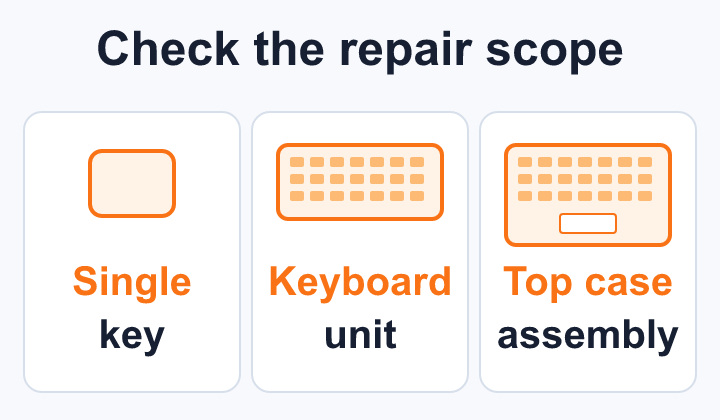
Laptop keyboard replacement cost depends on whether the job involves one key, a separate keyboard or a larger top-case assembly. Australian advertised prices may be starting totals or labour with parts added. Give each repairer the exact model and fault, then compare written fitted quotes for the same work.
A missing keycap, several dead keys and a keyboard affected by a spill are different enquiries. A cheap loose keyboard online is not the installed price, and a higher quote does not explain itself until you know which components are included.
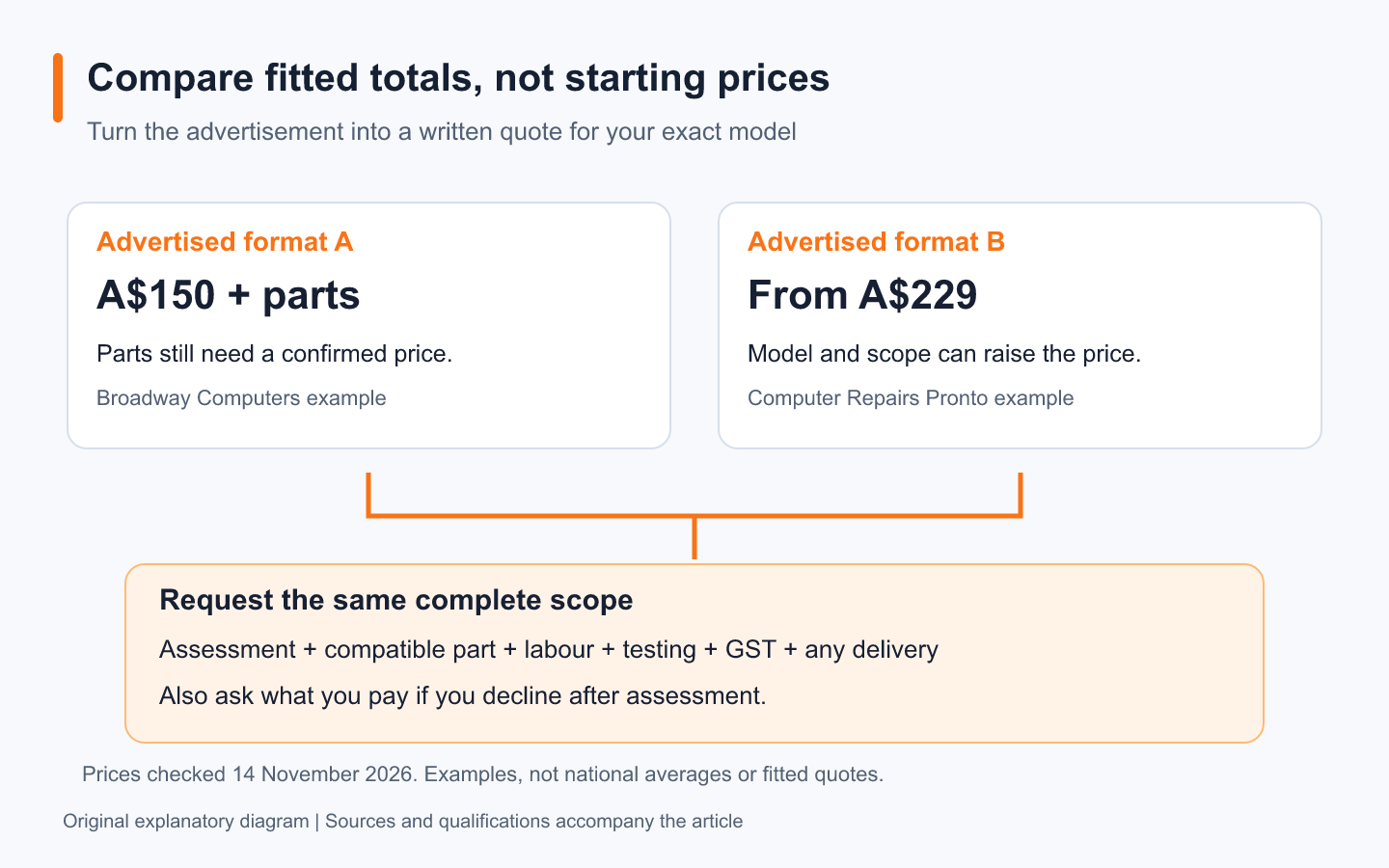
Two published prices, two different quote formats
These examples were checked on 14 November 2026. They show how offers are presented, not a national average or quotes for your laptop.
Scroll sideways if needed to read all columns.
| Repairer’s published offer | What the page establishes | What to ask before approving |
|---|---|---|
| Computer Repairs Pronto, Hills District NSW: keyboard replacement from A$229 | The starting price rises for models with the keyboard fixed to the palm rest. Its page lists an A$150 hands-on diagnostic fee, waived if proceeding. | The fitted total for your model, GST treatment, diagnostic charge if declining and any extra damage |
| Broadway Computers, Melbourne: keyboard/trackpad listed as A$150 plus parts | The offer adds parts to the stated amount. Its page says final cost depends on inspection and model, with GST included unless stated otherwise. | Which part is required, the complete installed amount and whether the quote concerns keyboard, trackpad or both |
Do not compare A$150 plus an unknown part with A$229 as though both were finished quotes. Ask for the same inclusions: assessment, compatible parts, labour, testing and any delivery or collection charges. Neither example establishes current stock or turnaround for your model.
Find out what “keyboard replacement” means on your laptop
The top case or palm rest is the upper section around the keyboard and trackpad. Some repairs replace a keyboard separately; other quoted assemblies contain more of this upper housing. Brand name alone does not determine the method.
Dell’s notebook keyboard replacement guidance shows one removable-keyboard design and directs owners to their model manual. Dell also sells combined palm-rest and keyboard assemblies. These illustrate different part scopes; the overseas part page is not an Australian repair-price estimate.
Scroll sideways if needed to read all columns.
| Possible scope | Question for the repairer |
|---|---|
| Keycap or retaining mechanism | Is the damage limited to that key, and is a compatible replacement available? |
| Separate keyboard | What exact keyboard is being fitted, with which layout and backlight features? |
| Keyboard with palm rest or top case | Which housing, trackpad or other components come with the assembly, and why is it required? |
| Damage beyond the keyboard | What has testing established, and what further work needs separate approval? |
Ask whether parts are new, refurbished or used, and what the repairer can actually source. A parts description such as “genuine” does not tell you its condition or the written warranty. Confirm the keyboard layout as well as the model number, especially on an imported laptop.
Describe the fault before authorising a part
For a dry laptop with no swelling or other safety concern, write down whether the fault affects one key, a row, the whole keyboard, the backlight or only a particular application. Note when it started and any recent drop, servicing or software change. Photographs help explain a missing key or damaged housing.
A working external keyboard can help you describe the symptom and may let you keep working temporarily. It does not prove that the internal keyboard is the only failed component. Avoid buying a replacement before assessment simply because a forum post describes similar behaviour.
If the fault followed a liquid spill, stop using and charging the laptop and seek service advice rather than repeatedly testing the keys. Dell’s safety guidance says to power off and disconnect AC after a spill, and not to attempt to power it on. Do not open an internal battery compartment without suitable model-specific guidance and skills. Tell the repairer what was spilled and when; a keyboard-only quote may not cover the resulting damage.
Agree fees, data access and the approval limit
Before leaving the laptop, ask what assessment costs if you decline the repair, whether that fee is credited when proceeding and when a deposit becomes payable. Put an approval limit on the job so a keyboard enquiry does not become permission for unrelated work.
Back up important files if the machine is safe and stable enough. The ACCC explains the written repair-notice requirements for consumer products that store user data and repairs that may use refurbished parts. Assessment-only intake is distinguished from accepting a product for repair. Read the notice and clarify any proposed reinstall, reset or data transfer before approval.
Ask why login access is needed and how testing can be arranged. Our laptop handover checklist covers backup and access preparation. Keep the account-access agreement separate from the price agreement.
Compare repair with the laptop you would otherwise keep using
A keyboard quote is easier to judge alongside the machine’s other known problems. Include any already-required battery, screen or hinge work, then compare that combined cost with a replacement that meets your actual needs. There is no useful universal percentage cutoff.
If the seller may owe a remedy for a product fault, check that route before approving private work. Our consumer-rights guide explains the distinction between a manufacturer’s warranty and Australian consumer guarantees. For the broader decision, use repair versus replacement.
Check the keyboard before collection
Ask the repairer to demonstrate the completed scope. Test ordinary typing, the affected keys, layout, shortcuts and backlight if fitted. If the job involved the top case, check the trackpad and other included controls too. Keep the itemised invoice, part description and repair terms.
To request comparable quotes, send your model code, a clear fault description, damage history and the same question: “What is the total fitted cost, what part does it include, and what do I pay if I decline after assessment?” Browse local computer repairers and confirm that the provider handles your model and fault before arranging a visit.
By Computer Repairs Near Me Team. Sources checked 14 November 2026. About our directory.
Find a repairer for this job
Check local repairers and ask whether they handle your device and fault.